A Teacher's Guide to Distance Learning

With the increased popularity of the Internet, computer technologies are receiving more and more attention as a means of delivering distance learning. The primary computer technologies used for distance education include e-mail, online collaborations, and Web-based education.
In addition to "regular" e-mail messages, bulletin boards and listserves can also be used to conduct distance learning initiatives. Bulletin boards (also called discussion groups or newsgroups) are electronic forums where students can "post" messages or read messages that others have posted. A threaded discussion group is a bulletin board that allows students to reply to specific messages (the reply is then indented or in some way linked to the original message). Listserves are automated e-mail distribution systems. In other words, if you send an e-mail message to a listserve, it will automatically be distributed to all other members of the listserve. Many faculty members establish bulletin boards or listserves for distance learning classes to facilitate the interactions among the students.
The advantages of e-mail communications include versatility and convenience. In addition to sending straight text, most e-mail systems now allow students to attach files. That means that they can send PowerPoint files, spreadsheets, or any other type of file to each other. The convenience of e-mail is that it can be accessed at any time of the day or night. In addition, students can often obtain an e-mail account for little or no cost.
Disadvantages of e-mail include the requirement to have an Internet connection and the complexity of learning to use e-mail software and attachments. Although more and more students have access to the Internet at home, it is not safe to assume that they will all have equal access. Prior to involving students in e-mail instruction, you must ensure that they all have the hardware, software, and knowledge to make the communications successful.
Online Collaboration: Internet Chat and Conferencing
E-mail communications are asynchronous, meaning that they do not take place simultaneously. However, synchronous communications are possible through online chat, shared whiteboards, and videoconferences.Online chat refers to a two-way, interactive exchange on the Internet. In chat mode, two or more people at remote computers connect to the same chat "room" and type messages. As each types his or her message, the others can see the messages on a shared screen (see Figure 7). Online chat allows students and teachers to communicate in "real-time." For example, many instructors will establish virtual office hours, during which they will be available to chat with any students who may have questions. Because the chat takes place on the Internet, there are no phone charges to worry about!
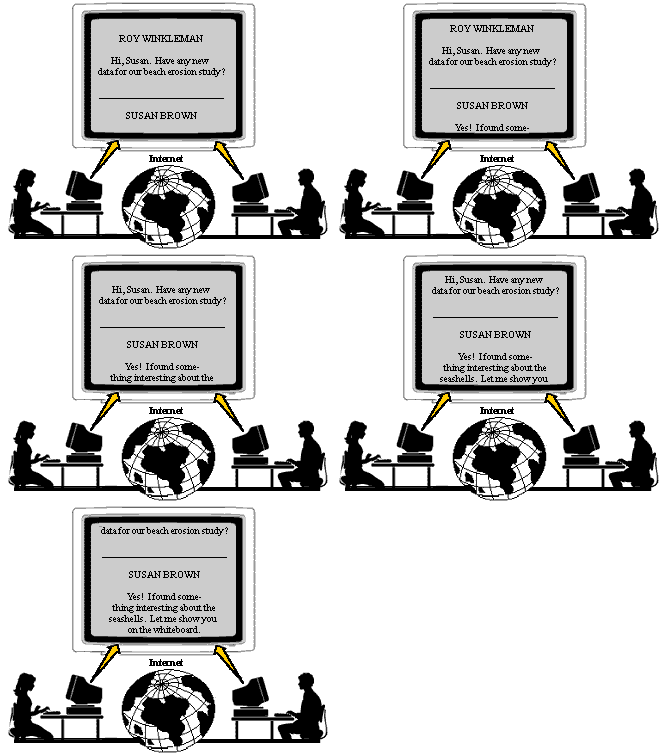
Figure 7. Chat screen.
Shared whiteboards are another form of collaboration of the Internet. If two or more people are connected to the Internet at the same time, they can communicate through graphic images on a shared whiteboard (see Figure 8). Simple drawing tools are provided that allow them to draw arrows, circles, and other simple symbols in the shared space. In addition, one or both of them can paste in images or text that was copied from another source. Some of the more advanced software even allows users at remote sites to share applications. For example, an instructor may have Excel on his or her computer and be able to display it on a remote student's computer. The student and teacher will both be able to input data and make revisions.
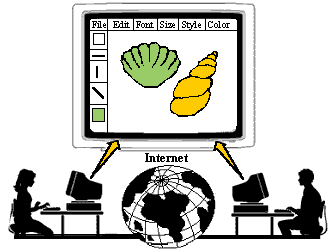
Figure 8. A shared white board in use.
The advantages of online collaboration through chat or shared whiteboards are that the communications are synchronous and the feedback for the students is immediate. The disadvantages include the need for similar software at both sites and the requirement to schedule the interactions in advance. In addition, the number of participants may be limited for simultaneous collaboration.
WebQuests
WebQuest is an inquiry-oriented activity that provides an excellent example of how the various resources on the Internet can be effectively integrated for a classroom project. WebQuests are designed to guide learners as they research a specific issue and to incorporate the results of the research into an authentic product or project.WebQuests are appealing to educators because they provide structure and guidance both for students and for teachers. The following six components are essential for implementing WebQuests.
- Introduction – Background on the activity to be completed
- Task – Description of main research question and anticipated end product
- Process – Steps for completing the task
- Resources – Websites that provide information relative to the task
- Evaluation – Guidelines for evaluation (often includes a rubric)
- Conclusion – Opportunities for reflection and extension
For more information about WebQuests, visit the WebQuest pages at http://www.webquest.org/index.php and http://www.zunal.com/.
Web-based Resources
The World Wide Web has opened a whole new arena for distance learning courses and the access to remote resources. The Web can be used to enhance education through remote access to resources or experts or it can be used to deliver educational programs.As an enhancement to education, teachers can locate relevant Websites for students to explore or have students conduct searches for information related to a specific topic. Bookmark files or Web pages with links can be developed to provide quick access to appropriate sites for the students. For example, Figure 9 presents a Web page that was created for the study of art.
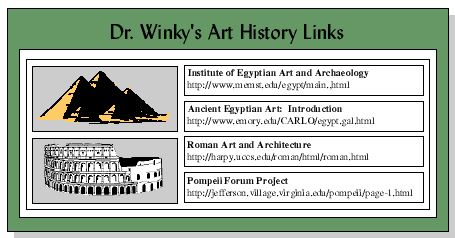
Figure 9. Web page with links to relevant art resources.
As a delivery tool, teachers can locate existing instruction on the Web, or they can create their own instruction. For example, the Blue Web'n site offers a list of tutorials that are appropriate for students in various topics and grade levels. See the Educational Technology Clearinghouse for additional resources for each subject area.
There is also a great deal of instruction on the Web that is designed for K-12 teachers. The Teacher's Guide to the Holocaust provides thousands of Web pages with images, sounds, original plays, student activities, and links to relevant Holocaust sites for teachers to use in the classroom (see Figure 10).
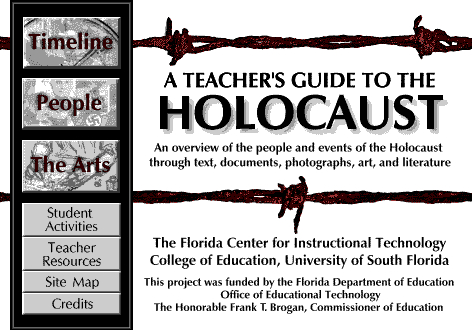
Figure 10. A Teachers Guide to the Holocaust at http://fcit.usf.edu/Holocaust.
Creating Web Resources for the Classroom
There are several ways that teachers can create Web resources for their classroom, including:
- Use a template - Websites, such as TeacherWeb, provide templates for teachers that are completely customizable and easy-to-use.
- Use an application program - Almost all applications, such as Microsoft Word or PowerPoint allow the user to convert the document to a Web page simply by selecting Save As...Web Page.
- Use a Web editor - Programs such as DreamWeaver and Nvu are designed to create Web pages. They provide a WYSIWYG (what you see is what you get) interface. Dreamweaver is commercial program by Adobe, while Nvu is a free program.
- Create a Web pages by hand - Web pages consist of HTML code, which can be typed into NotePad or other text editors. See Making the Connections for specific instructions on using HTML.
Many school districts are using a course management system (CMS) to provide a portal for students. For example, Blackboard offers a comprehensive system where students and parents can log in to access assignments, online resources, bulletin boards, quizzes, chat rooms, and a gradebook. Systems such as Blackboard can be used to deliver an entire distance learning course or to supplement a traditional classroom. Although Blackboard requires a fee, Moodle is a course management system that is open source and completely free to use.
Advantages of Computer Technologies
- Allow self-paced instruction. Computers allow learners to proceed at their own pace, receive feedback immediately, and review as often as they like.
- May incorporate text, graphics, audio, and video. With the trend toward digital audio, digital video, and computer animations, it is easy to incorporate various media into computer programs.
- Allow high levels of interactivity. Computer technologies allow embedded questions and interactions, as well as online collaboration.
- Provide written record of discussions and instruction. Computer logs can easily be generated for computer interactions in distance learning.
- Inexpensive. With access to the Internet, it is relatively inexpensive to participate in computer technologies for distance learning.
- Worldwide access. The Internet can be accessed by millions of people throughout the world. There is no other way to reach so many people for so little money.
Disadvantages of Computer Technologies
- Require hardware and software. At a minimum, a computer and Internet connection are required for most distance learning options that involve computers.
- Generally rely on written communications. Although it is possible to include audio and video in computer-based distance learning, most of the communications are in the form of text.
- Require substantial planning . E-mail and other asynchronous computer technologies require a great deal of planning and preparation on the part of the instructor.
- Computer viruses. If students send assignments via a computer, there is always a risk of viruses -- especially if they send programs or attached files.
- No guaranteed performance. Computer networks are notoriously unreliable. If students wait until the last minute to check their e-mail messages or search the Web, there is always the risk the server may be down or the Websites may have moved.
Guidelines for Incorporating Computer Technologies
- Provide adequate structure and guidelines. The most successful asynchronous projects include deadlines and a structure.
- Provide timely feedback to participants. Since the communications in computer-based distance learning are more impersonal than video-based delivery, it is extremely important to provide quick and relevant feedback to students.
- Get to know the students. If possible, try to meet the students, either in person or through video. In some cases, the students may be able to meet once or twice; if not, videotapes can be sent to students to increase personal communications.
- Ensure sufficient technical support. In a perfect world, the computer and the technology would be invisible to the students. It is very important to provide sufficient technical support so that the students can get help when they need it.


|
Produced by the Florida Center for Instructional Technology,
College of Education, University of South Florida © 1999, 2009.