A Teacher's Guide to Distance Learning

The ability to see and hear an instructor offers opportunities for behavior modeling, demonstrations, and instruction of abstract concepts. Video techniques for distance learning are often characterized by the transmission media (videotapes, satellites, television cables, computers, and microwave). Each of the media can be described as it relates to the direction of the video and audio signals -- one-way video; two-way video; one-way audio; and two-way audio (see Figure 11).
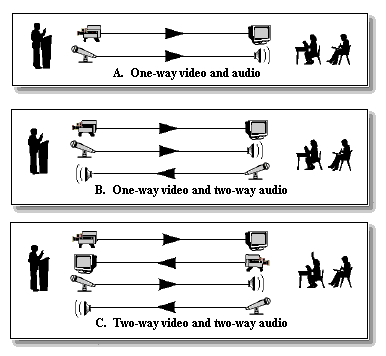
Figure 11. Three audio and video configurations.
Videotape and DVD
Videotapes and DVDs offer popular, easy-to-use formats for instructional materials. Almost all students have access to a videotape or DVD player in the homes, and they are also common at school. Videotapes and DVDs have several advantages for the delivery of distance learning. In addition to easy access to the hardware, the tapes and discs are quite inexpensive. If a video camcorder is available, video is relatively easy to record (although professional staff and equipment provide in a much better product than will an amateur production team). Disadvantages of videotapes and DVDs include the fact that they are not interactive. In addition, they can be costly to send via the mail.Satellite Videoconferencing
Full-motion video teleconferencing (referred to as videoconferencing) offers the "next best thing to being there." Satellite transmission is one of the oldest, most established techniques for videoconferencing. In most cases, satellite delivery offers one-way video and two-way audio.Two sets of equipment are needed for satellite systems. The uplink (a large satellite dish) transmits the video and audio signals to the satellite. The downlink (a small dish antenna) receives and displays the signals (see Figure 12).
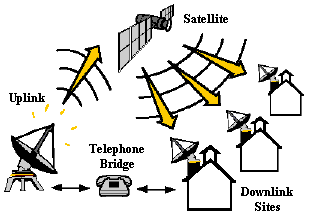
Figure 12. Configuration for satellite videoconferences.
When satellite videoconferences are used for distance learning, a studio classroom must be properly wired for the lighting, microphones, and cameras needed to produce an acceptable lesson. The cameras are usually connected to a control room, where one or more technicians control the signals. The resulting television signal is then sent to the uplink transmitter. Uplink transmitters are very expensive and are often shared with other schools or businesses.
The receiving sites of satellite videoconferences (in most cases other schools) must have satellite downlinks. These dishes select, amplify, and feed the signals into the classrooms, where they can be displayed on standard television monitors. To provide two-way audio with interactions from the remote classrooms back to the teacher, a telephone bridge is usually employed.
Satellite videoconferencing can be very expensive. It may not be cost-effective for most school systems to use uplinks to originate distance-education classes unless the school systems were in a position to market the classes over wide geographic areas. It is reasonable, however, for a school to use a downlink to receive commercial courses that are delivered through satellite channels.
Microwave Television Conferencing
Satellites are a popular method for enabling video communications over long distances. Microwave transmissions provide a cost-effective method for videoconferencing in more localized areas. Most microwave systems are designed to transmit video signals to areas that are not more than 20 miles apart (see Figure 13).
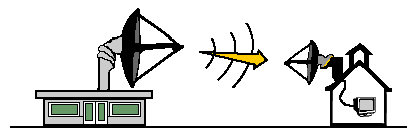
Figure 13. Configuration for microwave transmission.
The most common microwave systems use frequencies that have been designated by the Federal Communications Commission (FCC) as Instructional Television Fixed Service (ITFS) stations. When compared with satellite or commercial broadcast television, ITFS stations operate at a lower power, and the transmission equipment is relatively inexpensive. Reception equipment is also reasonably priced, as long as the receiving sites are located within 20 miles of the transmitter and there are no hills or tall buildings to block the line-of-sight signal.
One drawback of microwave ITFS communication involves the limited number of channels available in any one area. Many metropolitan areas already have all available channels in use, so no further expansion of ITFS teleconferencing is possible in these areas.
Cable and Broadcast Television
Cable and public broadcast television have been used to distribute instruction for years. In addition to the educational networks, almost all public cable television systems allow schools to transmit television courses. This type of connection can be used to transmit one-way video and one-way audio to the community at large or between specific schools. For example, if two area high schools do not each have enough students to justify an advanced math course, they might team up to teach a single course delivered through cable television. In one school, the teacher would conduct a regular class; in the other school, the students would watch and listen through a standard cable television channel.Distance learning through cable television systems requires both a studio and channels through which to broadcast. The cost depends largely on the "partnership" offered by the cable or broadcast system. Even though the broadcast will take place at a scheduled time, research shows that the majority of the students will record the program and play it back at a convenient time.
Desktop Videoconferencing
Desktop videoconferencing uses a computer along with a camera and microphone at one site to transmit video and audio to a computer at another site or sites. The remote sites also transmit video and audio, resulting in two-way video and two-way audio communications.
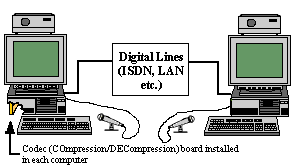
Figure 14. Configuration for desktop videoconferencing.
Although desktop videoconferencing is considerably less expensive than satellite or microwave systems, there are a couple of limitations. First, the images are usually transmitted at 15 images per second, half the normal video speed. This causes the video to appear somewhat jerky if any rapid motion takes place. A second concern is related to the connection between the computers. Most systems are connected either through local area networks (LANs) or through relatively fast connections (see Figure 14).
Internet Videoconferencing
It is also possible to conduct videoconferences over the Internet. You need a video camera and digitizing card/camera to transmit video signals as well as a microphone and speakers/headset (see Figure 15).
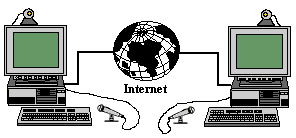
Figure 15. Configuration for Internet videoconferencing.
Internet videoconferencing usually results in a small image, which may be jerky (a few frames per second), depending on the speed of the Internet connection. In most cases, a regular modem is far too slow to transmit effective video.
Advantages of Video Technologies
- Allow both audio and video communications. Video technologies can provide the visual and audio realism of a face-to-face class. It is generally considered the "next best thing to being there."
- Facilitate personal feelings. Video technologies enable students and instructors to see facial expressions and body language, adding personalities to communication.
- Enable high levels of interaction. Most video communications are synchronous, allowing high degrees of interactions, questions and answers, etc.
Disadvantages of Video Technologies
- May be expensive. Cameras and editing equipment can be expensive. In addition, the infrastructure at each site and the links between sites can be costly.
- Require a great deal of planning and preparation. To be effective, the camera crews and the instructor must practice and become a team. Faculty members generally need practice and training to be effective in this domain.
- Must be scheduled. Most videoconferences are not spontaneous. Instead, they must be planned and the necessary resources must be scheduled.
- Require technical support team. Because of the complexity of video recording, mixing, and transmission, a technical support team is required. In addition, site facilitators are necessary to ensure the equipment works properly at the receiving stations.
Guidelines for Incorporating Video Technologies
- Avoid the "talking head." "The early days of distance education witnessed the inclusion of the worst aspects of the old passive/lecture paradigm, which were even more deadly from a distance than in person" (Parker, 1997, 10). Talking head refers to simply videotaping the instructor while she or he is talking. Instead, try to vary the camera angle, include still images of appropriate graphics, and encourage student interactions.
- Practice with the cameras and the crew before the lesson. It is important to plan practice times for the instructor and the camera crew. By working together, they can anticipate each other's needs and provide the best possible transmissions.
- Encourage interactions. Interactions can be added to video-based delivery in many ways. If the lessons are two-way, questions and other types of interactions can be included. If they are one-way video, interactions can be added through e-mail messages or the telephone.
- Use the best cameras possible. The old saying "garbage in; garbage out" is very true of video. The very best possible quality equipment should be used.
- Ensure quality audio. Losses in audio quality will be noticeable long before losses in video quality. Always ensure good recording, playback, and speaker quality.
Summary of Distance Learning Technologies
The following table summarizes the advantages and disadvantages of the major distance learning technologies.
|


Produced by the Florida Center for Instructional Technology,
College of Education, University of South Florida © 1999 2009.