Overview Decide Design Deliver Evaluate
 
  Objectives
TOPICS
A. Decide on Relevant Standards and Benchmarks
B. Decide if Multimedia is Appropriate
C. Decide on Learning Outcomes
D. Decide on Appropriate Assessment Measures
Assignments


A. Decide on Relevant Standards and Benchmarks

There are two sets of important standards for multimedia activities -- The Sunshine State Standards and the National Educational Technology Standards.

Sunshine State Standards

The Sunshine State Standards do not tell teachers how to teach. They are simply guidelines to assist teachers in designing instruction to meet student needs, and more importantly, to identify the essential knowledge and skills that students should learn and for which the state will hold schools accountable.

The Sunshine State Standards consist of strands, standards, and benchmarks. A strand is the most general type of information. It is a label for a category of knowledge. A standard is a description of general expectations regarding the knowledge and skill development within a strand. The most specific level of information, a benchmark, is a statement of expectations of student knowledge and skill by the end of each developmental level (see below).
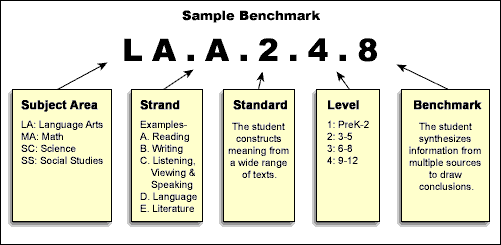


In the subject areas of language arts, mathematics, science, and social studies, the Sunshine State Standards have recently been expanded to include Grade Level Expectations.

Any lesson based on content standards generates a rich and challenging experience for all students. Teachers should determine the appropriate content standards, then determine if multimedia activities could be beneficial for teaching the standards. When a lesson involves the use of multimedia as a tool, it can correspond with several content standards. For example, consider a multimedia activity (in 5th grade) that involves writing a script and producing a digital movie about the history of the local community. This activity could address all of the following Language Arts standards -- not to mention standards in Social Studies, Visual Arts, and perhaps Mathematics!

  • LA. A 2.2 - reads and organizes information for a variety of purposes, including making a report, conducting interviews, taking a test, and performing an authentic task
  • L.A. A 2.2 - creates narratives in which ideas, details, and events are in a logical order and are relevant to the story line
  • LA. B. 2.2 - writes notes, comments, and observations that reflect comprehension of content and experiences from a variety of media
  • LA. B. 2.2 - writes for a variety of occasions, audiences, and purposes
  • LA. B. 2. 2 - participates as a contributor and occasionally acts as a leader in a group
  • LA. C. 1.2 - responds to speakers by asking questions, making contributions, and paraphrasing what is said
  • LA. C. 3. 2 - speaks for specific occasions, audiences, and purposes, including conversations, discussions, projects, and informational or imaginative presentations theme, simile, alliteration, and assonance.
  • LA. D. 1.2 - understand that language formality varies according to situations and audiences
  • LA. D. 2.2 - recognizes different techniques used in media messages and their purposes
  • LA. D. 2.2 - selects and uses appropriate technologies to enhance efficiency and effectiveness of communication
  • LA. D. 2.2 - understands that a variety of messages can be conveyed through mass media.


National Educational Technology Standards for Students

The Sunshine State Standards are specific to Florida and are related to subject areas; the National Educational Technology Standards for Students (NETS) are cross-curricular and apply to schools throughout the nation. These technology standards focus on six areas of technology competencies:

  1. Basic operations and concepts
  2. Social, ethical, and human issues
  3. Technology productivity tools
  4. Technology communication tools
  5. Technology research tools
  6. Technology problem-solving and decision-making tools

The categories provide a framework for linking performance indicators to the standards for Grades PreK-2; 3-5; 6-8; and 9-12. For example, prior to the completion of grade 5, students should be able to:

  1. Use keyboards and other common input and output devices (including adaptive devices when necessary) efficiently and effectively.
  2. Discuss common uses of technology in daily life and the advantages and disadvantages those uses provide.
  3. Discuss basic issues related to responsible use of technology and information and describe personal consequences of inappropriate use.
  4. Use general purpose productivity tools and peripherals to support personal productivity, remediate skill deficits, and facilitate learning throughout the curriculum.
  5. Use technology tools (e.g., multimedia authoring, presentation, Web tools, digital cameras, scanners) for individual and collaborative writing, communication, and publishing activities to create knowledge products for audiences inside and outside the classroom.
  6. Use telecommunications efficiently to access remote information, communicate with others in support of direct and independent learning, and pursue personal interests.
  7. Use telecommunications and online resources (e.g., e-mail, online discussions, Web environments) to participate in collaborative problem-solving activities for the purpose of developing solutions or products for audiences inside and outside the classroom.
  8. Use technology resources (e.g., calculators, data collection probes, videos, educational software) for problem solving, self-directed learning, and extended learning activities.
  9. Determine which technology is useful and select the appropriate tool(s) and technology resources to address a variety of tasks and problems.
  10. Evaluate the accuracy, relevance, appropriateness, comprehensiveness, and bias of electronic information sources.

The intent of the NETS for Students is that technology be an integral component or tool for learning within the context of academic subject areas.


Try This

  1. Which of the Sunshine State Standards that you address in your classroom could be enhanced through multimedia activities? Look for at least five.
  2. Look at the National Educational Technology Standards for Students. Do you think the students at your grade level meet these standards? Which standards are being addressed and which ones need more attention?


Back to Top | Continue to B

Site Map
This course was developed in partnership between the Pinellas School
District
and FCIT at USF. Please send
comments or corrections.
Overview Design Intro Deliver Evaluate






