

| |
What is the Technology Integration Matrix?
The
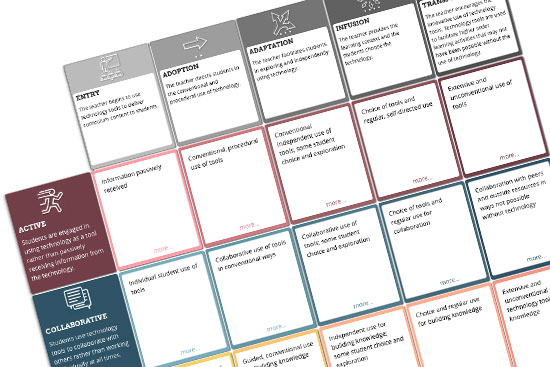
Technology Integration Matrix (TIM) illustrates how teachers can use
technology to enhance learning for K-12 students. The TIM incorporates
five interdependent characteristics of meaningful learning environments:
active, constructive, goal directed (i.e., reflective), authentic,
and collaborative (Jonassen, Howland, Moore, & Marra, 2003).
The
TIM associates five levels of technology integration (i.e., entry,
adoption, adaptation, infusion, and transformation) with each of the
five characteristics of meaningful learning environments. Together,
the five levels of technology integration and the five characteristics
of meaningful learning environments create a matrix of 25 cells as
illustrated below.
What
is the history behind the tool?
The Technology
Integration Matrix (TIM) was developed to help guide the complex task
of evaluating technology integration in the classroom. Basic technology
skills and integration of technology into the curriculum go hand-in-hand
to form teacher technology literacy. Encouraging the seamless use of
technology in all curriculum areas and promoting technology literacy
are both key NCLB:Title II-D/EETT program purposes. The Inventory for
Teacher Technology Skills (ITTS) companion tool is designed to help
districts evaluate teachers’ current levels of proficiency with
technology and is also used as a professional development planning
and needs assessment resource. The TIM is envisioned as an EETT program
resource which can help support the full integration of technology
in Florida schools.
What
is in each cell?
Each cell
in the matrix will have a video (or several videos) which illustrate
the integration of technology in classrooms where only a few computers
are available and/or classrooms where every student has access to a
laptop computer.
How
should the Technology Integration Matrix be used?
The TIM is
designed to assist schools and districts in evaluating the level of
technology integration in classrooms and to provide teachers with models
of how technology can be integrated into instruction in meaningful
ways. It is the Department’s intent that the TIM be used in the
context of comprehensive technology planning and EETT program accountability.
What
are the next steps for developments with the Matrix?
One consideration is to develop
a supplementary TIM component/tool to help place teachers into the
appropriate spot or region of the grid. Initial explorations into making
an additional section on the Inventory of Teacher Technology Skills
have received positive feedback, citing the need for more integration
evaluation and professional development. Additional resources such
as lesson plans and teaching materials are being developed so teachers
can use the tool for professional growth. The TIM will initially be
pilot tested by interested districts in an informal evaluation mode.
The Bureau of Instruction and Innovation will be seeking input and
comments (from teachers and district personnel) on an ongoing basis
regarding potential uses of this new evaluation tool. Districts will
be encouraged to use the TIM in the context of technology integration
goal development and associated professional development planning.
Through regular classroom observation and targeted professional development
activities (organized through the Florida Digital Educator Program),
it is our hope that over time teachers will be able to effectively
monitor their progress through a continuum of technology integration
levels.
The videos on this site require QuickTime 7, a free plug-in from Apple.
| |
Levels
of Technology Integration into the Curriculum
|
|
Technology
Integration
Matrix
|
Entry
The teacher uses technology to
deliver curriculum content to students. |
Adoption
The teacher directs students in the conventional
use of tool-based software. If such software is available, this
level is the recommended. |
Adaptation
The teacher encourages adaptation of tool-based
software by allowing students to select a tool and modify its
use to accomplish the task at hand. |
Infusion
The teacher creates a learning environment that
infuses the power of technology tools throughout the day across
subject areas. |
Transformation
The teacher creates a rich learning environment
in which students regularly engage in activities that would
have been impossible to achieve without technology. |
|
|
Active
Students are actively engaged in using technology
as a tool rather than passively receiving information from
the technology. |
|
| Indicator: Students
begin to utilize technology tools to create products,
for example using a word processor to create a report. |
1-1
access
shared
access |
|
| Indicator: Students
have opportunities to select and modify technology tools
to accomplish specific purposes, for example using colored
cells on a spreadsheet to plan a garden. |
1-1
access
shared
access |
|
| Indicator: Throughout
the school day, students are empowered to select appropriate
technology tools and actively apply them to the tasks
at hand. |
1-1
access
shared
access |
|
| Indicator: Given
ongoing access to online resources, students actively
select and pursue topics beyond the limitations of even
the best school library. |
1-1
access
shared
access |
|
Collaborative
Students use technology tools to collaborate
with others rather than working individually at all times. |
|
| Indicator: Students
have opportunities to utilize collaborative tools, such
as email, in conventional ways. |
1-1
access
shared
access |
|
| Indicator: Students
have opportunities to select and modify technology tools
to facilitate collaborative work. |
1-1
access
shared
access |
|
| Indicator: Throughout
the day and across subject areas, stud ents utilize technology
tools to facilitate collaborative learning. |
1-1
access
sharedaccess |
|
| Indicator: Technology
enables students to collaborate with peers and experts
irrespective of time zone or physical distances. |
1-1
access
shared
access |
|
Constructive
Students use technology tools to build
understanding rather than simply receive information. |
. |
| Indicator Students
begin to utilize constructive tools such as graphic organizers
to build upon prior knowledge and construct meaning. |
1-1
access
Shared access |
|
| Indicator: Students
have opportunities to select and modify technology tools
to assist them in the construction of understanding. |
1-1
access
Shared
access |
|
| Indicator: Students
utilize technology to make connections and construct understanding
across disciplines and throughout the day. |
1-1
access
Shared
access |
|
| Indicator: Students
use technology to construct, share, and publish knowledge
to a worldwide audience. |
1-1
access
Shared
access |
|
Authentic
Students use technology tools to solve
real-world problems meaningul to them rather than working on artificial
assignments. |
| Indicator: Students
use technology to complete assigned activities that are
generally unrelated to real-world problems. |
1-1
access
Shared
access |
|
| Indicator: Students
have opportunities to apply technology tools to some content-specific
activities that are based on real-world problems. |
1-1
access
Shared
access |
|
| Indicator: Students
have opportunities to select and modify technology tools
to solve problems based on real-world issues. |
1-1
access
Shared
access |
|
| Indicator: Students
select appropriate technology tools to complete authentic
tasks across disciplines. |
1-1
access
Shared
access |
|
| Indicator: By
means of technology tools, students participate in outside-of-school
projects and problem-solving activities that have meaning
for the students and the community. |
1-1
access
Shared
access |
|
Goal
Directed
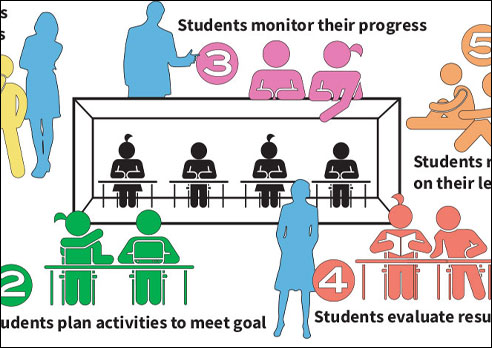
Students use technology tools to set goals,
plan activities, monitor progress, and evaluate results rather
than simply completing assignments without reflection. |
| Indicator: Students
receive directions, guidance, and feedback from technology,
rather than using technology tools to set goals, plan activities,
monitor progress, or self-evaluate. |
1-1
access
Shared
access |
|
| Indicator: From
time to time, students have the opportunity to use technology
to either plan, monitor, or evaluate an activity. |
1-1
access
Shared
access |
|
| Indicator: Students
have opportunities to select and modify the use of technology
tools to facilitate goal-setting, planning, monitoring,
and evaluating specific activities. |
1-1
access
Shared
access |
|
| Indicator: Students
use technology tools to set goals, plan activities, monitor
progress, and evaluate results throughout the curriculum. |
1-1
access
Shared
access |
|
| Indicator: Students
engage in ongoing metacognative activities at a level that
would be unattainable without the support of technology
tools. |
1-1
access
Shared
access |
|
*You can download the Technology
Integration Matrix for printing as a PDF.
The Technology Integration Matrix
Produced by the Florida Center for Instructional Technology,
College of Education, University of South Florida © 2009.
Funded by grants from the Florida Department of Education. |
| |