
Keyboarding Skills
TIM videos are hosted on YouTube. If YouTube is blocked on your network, please use the following link:
Active Learning | Entry Level
Subject: Language Arts
Video Transcript
In the beginning of the school year I assigned keyboarding skills for morning work. My goal for the students in having them practice their keyboarding skills on a daily basis is so that in the future, and further on in the school year, we can do projects on word processing programs and the children are confident typing and the keyboarding skills won’t hold them up.
I found some websites, Typershark, that when the children have proficient typing skills it helps with their speed. It also helps with their spelling as the shark comes across the screen and they have to type the words on the sharks.
Video Transcript
[Teacher voiceover]
In the beginning of the school year I assigned keyboarding skills for morning work. My goal for the students in having them practice their keyboarding skills on a daily basis is so that in the future, and further on in the school year, we can do projects on word processing programs and the children are confident typing and the keyboarding skills won’t hold them up.
I found some websites, Typershark, that when the children have proficient typing skills it helps with their speed. It also helps with their spelling as the shark comes across the screen and they have to type the words on the sharks.
Objectives
- Increase typing speed.
- Increase spelling accuracy.
- Become more familiar and competent in using the keyboard.
Procedure
- Students complete the lesson using individual desktop computers with headsets.
- Students use the TyperShark software that was downloaded on the desktops.
- Students type words on the sides of sharks to zap them as they swim across the screen.
- The program assists students with typing speed and spelling accuracy.
Technology Present
- Desktop computers
- Headsets
- Typing practice website
Grade Level: 3-5
Note: The TIM is about teaching, not technology. The placement of videos on the TIM is based entirely on the teaching practices demonstrated in the lesson and not on the specific technology employed. Simple or even out-dated technology can be used at the higher levels of technology integration just as the latest or most complex technology can be used at lower levels.
Video Reference Number: 1041
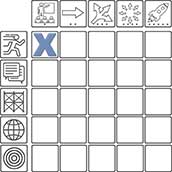
Active Learning
• Entry: LA MA SC SS
• Adoption: LA MA SC SS
• Adaptation: LA MA SC SS
• Infusion: LA MA SC SS
• Transformation: LA MA SC SS
Collaborative Learning
• Entry: LA MA SC SS
• Adoption: LA MA SC SS
• Adaptation: LA MA SC SS
• Infusion: LA MA SC SS
• Transformation: LA MA SC SS
Constructive Learning
• Entry: LA MA SC SS
• Adoption: LA MA SC SS
• Adaptation: LA MA SC SS
• Infusion: LA MA SC SS
• Transformation: LA MA SC SS
Authentic Learning
• Entry: LA MA SC SS
• Adoption: LA MA SC SS
• Adaptation: LA MA SC SS
• Infusion: LA MA SC SS
• Transformation: LA MA SC
Goal-Directed Learning
• Entry: SS LA MA SC SS
• Adoption: LA MA SC SS
• Adaptation: LA MA SC SS
• Infusion: LA MA SC SS
• Transformation: LA MA SC SS